Your website can load perfectly in Chrome, appear in Google, and still be unavailable to a crawler that could help a customer discover your company through an AI search service. We ran into that exact situation on Elite SEO Consulting’s own website in November 2026. The problem was not a missing web page. It was a hosting-level security rule.
This guide shows website owners how to find out whether AI search crawlers can actually retrieve their websites, how to interpret the results, and when to involve their hosting provider. It also explains why a test that returns “200 OK” is useful but not proof that a genuine crawler will always get through.

Why AI Website Accessibility Is a Business Issue
Before an AI-assisted search system can consider information from your pages, the relevant crawler or retrieval service generally needs a usable way to access that information. It may discover pages through its own crawler, a search index, links, or user-requested retrieval. Access is a prerequisite in some paths, not a promise of inclusion, citation, rankings, or leads. A blocked site may lose discovery opportunities while its owners see no obvious error in their ordinary browsers.
The first objective is therefore simple: remove unintended technical barriers from important public pages. The next objectives—communicating what the business does, proving its credibility, satisfying buyer intent, and measuring inquiries—are covered in our AI Search Optimization services and GEO resources.
Know Which AI Crawler You’re Testing
AI crawlers do not all do the same job. OpenAI distinguishes its search crawler from its model-training crawler and user-initiated web requests. Perplexity and Anthropic also have different crawler and retrieval identities. That matters when you decide what to permit.
| Agent | General purpose | Why a business should check |
|---|---|---|
| OAI-SearchBot | ChatGPT Search crawling | Directly relevant to ChatGPT Search discovery |
| ChatGPT-User | User-triggered ChatGPT retrieval | Relevant when a person asks ChatGPT to access a page |
| GPTBot | OpenAI training-related crawling | Separate content-use policy decision; not the same as search discovery |
| Googlebot | Google Search crawling | Baseline technical SEO and Google search eligibility |
| Claude-SearchBot | Anthropic search-related retrieval | More relevant to Claude search than ClaudeBot |
| ClaudeBot | Anthropic model-training crawler | Separate training-related decision |
| PerplexityBot | Perplexity automated search crawling | Relevant to Perplexity discovery |
| Perplexity-User | Perplexity user-requested retrieval | Different from its automatic search crawler |
Start with the provider documentation: OpenAI crawlers, Perplexity crawlers, and Google’s Googlebot verification guidance. The exact tokens, IP ranges, and rules can change, so check them before changing a firewall.
Step 1: Open Your robots.txt File
Visit https://yourdomain.com/robots.txt. This is the file used to communicate crawling preferences to compliant bots. Look for broad exclusions such as User-agent: * followed by Disallow: /, as well as restrictions targeting particular AI crawlers. Check whether the file itself is reachable and returns an appropriate successful status.
User-agent: OAI-SearchBot
Allow: /

User-agent: GPTBot
Disallow: /
This is only an illustrative policy showing that search visibility and training permissions can be treated separately. Do not overwrite existing directives or copy the sample blindly. A successful robots.txt fetch also does not prove the homepage can be fetched: the server may apply different protections by URL, user agent, or network.
Step 2: Run a Five-Crawler Test in Windows PowerShell
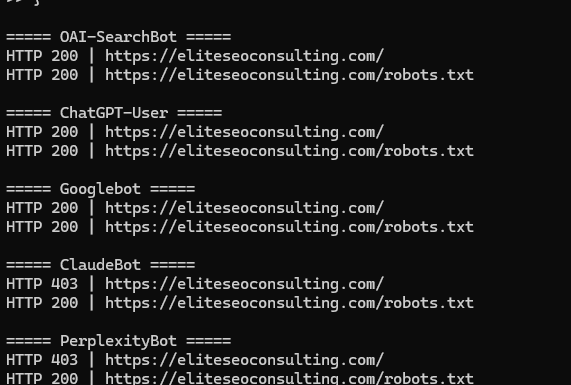
On Windows, open PowerShell from the Start menu. Paste the complete script below, replacing the domain with your own. It requests the homepage and robots.txt using five different user-agent strings and displays the final HTTP status codes.
$bots = @(
  "OAI-SearchBot",
  "ChatGPT-User",
  "Googlebot",
  "ClaudeBot",
  "PerplexityBot"
)
$paths = @("/", "/robots.txt")
foreach ($bot in $bots) {
  Write-Host "`n===== $bot ====="
  foreach ($path in $paths) {
    $url = "https://yourdomain.com$path"
    curl.exe -sS -L --max-time 20 -A $bot -o NUL -w "HTTP %{http_code} | $url`n" $url
  }
}
This is a basic access-screening test, not a full crawl audit. If your server returns 200, it accepted that simulated request; it may still serve a challenge or incomplete HTML, so inspect content if results look suspicious. If it returns 403 or 429, investigate access controls and rate limits. A 200 from your own computer is not proof that traffic from a verified crawler IP is allowed.
Read the Status Codes Correctly
| Status | Meaning | Next action |
|---|---|---|
| 200 | Request succeeded | Check that the returned body is actual page content |
| 301/302 | Redirect | Follow the chain to its final URL and status |
| 403 | Access forbidden | Check firewall, WAF, hosting security and rules |
| 429 | Rate limited | Check throttling and bot management |
| 5xx | Server problem | Investigate origin, application, proxy and hosting logs |
| 000 | No response obtained | Check DNS, TLS, connectivity or timeout |
Step 3: Test Search and User-Retrieval Bots Separately
When we tested Elite SEO Consulting, the initial simulated requests for ClaudeBot and PerplexityBot returned 403 on the homepage. We then tested their related search and retrieval agents separately. Those requests returned HTTP 200. It would have been inaccurate to say “Claude is blocked” or “Perplexity is completely blocked” based on the first tests alone.
curl.exe -sS -L -A "Claude-SearchBot" -o NUL -w "HTTP %{http_code}`n" https://yourdomain.com/
curl.exe -sS -L -A "Perplexity-User" -o NUL -w "HTTP %{http_code}`n" https://yourdomain.com/
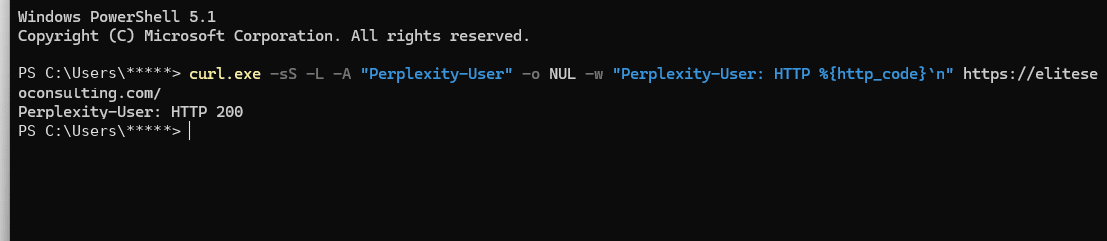
These tests distinguish the advertised crawler identities. They do not authenticate the caller as Anthropic or Perplexity. Some firewalls use both a user-agent string and verified IP ranges, and some allow only one of those signals.
Step 4: Look Beyond robots.txt to Hosting Firewalls
Our own hosting provider confirmed that its shared hosting environment applied a server-wide ModSecurity ruleset that blocked various crawlers before requests reached WordPress. Their support team applied a targeted account-level exception for OpenAI-related crawler traffic. After that change, ChatGPT Business Hub displayed Access confirmed.
The lesson is bigger than one hosting company. Security rules may be enforced by ModSecurity, a web application firewall (WAF), CDN bot protection, a WordPress security plugin, a reverse proxy, or upstream infrastructure. Your WordPress plugin dashboard may not show the rule because the request never reached WordPress.
What to Ask Your Hosting Provider
Our website loads normally for people, but AI crawler access tests show some requests returning 403. Please check server-wide ModSecurity, WAF, CDN, and bot protection logs for requests to the homepage and robots.txt. Confirm whether verified OAI-SearchBot, ChatGPT-User, Googlebot, Claude-SearchBot, PerplexityBot and Perplexity-User traffic is permitted. If a legitimate crawler is blocked, please identify the specific rule and implement a narrow exception without disabling security generally.
Ask for a clear distinction between simulated user-agent tests and actual requests from the provider’s published IP ranges. If a firewall intercepts requests before the site’s access log is written, your host may need to inspect separate security logs.
Step 5: Verify the Fix from Multiple Angles
Once a rule is adjusted, rerun the same commands and save the before-and-after results. Then check the site with the platform’s actual diagnostics, if offered. For ChatGPT Business Hub, a switch from “Couldn’t read website” to “Access confirmed” is direct evidence that the Hub’s website-access check now succeeds. It does not independently certify every OpenAI system or every crawler.
Review the public page source for a meaningful title, service copy, canonical URL, crawlable internal links, and readable content. Also check Google Search Console for indexing and technical problems, and verify that important pages are not inadvertently set to noindex. A crawlable page still needs a reason to be selected for an answer.
Case Study: The Exact Problem We Found on Our Own Site
On November 11, 2026, Elite SEO Consulting’s ChatGPT Business Hub initially reported that it could not read eliteseoconsulting.com. Server logs referenced attempts to serve a missing 403.shtml page, pointing toward access-denied activity but not proving the cause. A small raw access sample showed a crawler user agent receiving 403 for robots.txt while a browser-identifying request from the same IP was accepted. We inspected the hosting security layer.
It confirmed that a server-wide ModSecurity ruleset blocked several crawlers and applied an account-specific OpenAI exception. The Business Hub subsequently showed Access confirmed. In our additional simulated tests, OAI-SearchBot, ChatGPT-User, Googlebot, Claude-SearchBot and Perplexity-User received 200, while ClaudeBot and PerplexityBot received 403 on the homepage. That is a documented diagnostic sequence, not a claim that rankings or leads increased.
Prioritize Fixes by Business Value
For a business seeking leads through search and AI answers, begin with access to the homepage, main service pages, service-area pages, contact information, and evidence pages. Correct blocking and errors, then strengthen useful content and conversion pathways. That sequence follows the same practical principle behind our Quickest Path to ROI SEO: fix obstacles between prospective customers and the business before pursuing less immediate improvements.
For a broader technical review, see our SEO consulting services or guide to website structure.
Frequently Asked Questions
Does HTTP 200 mean ChatGPT will recommend my business?
No. It shows that the tested request succeeded, not that the source was selected, cited, or recommended for a user’s question.
Can my website work for Google but fail for AI crawlers?
Yes. Separate agent policies and security layers may treat bot identities differently. Test each relevant agent independently.
Should I allow GPTBot if I want ChatGPT Search visibility?
Not necessarily. OpenAI documents OAI-SearchBot separately from GPTBot. Make your training and search permissions decisions intentionally.
Why does robots.txt work while the homepage returns 403?
Different URL paths, user agents, upstream rules, or challenge policies can generate different responses. Inspect both resources.
What if my hosting provider says everything is fine?
Share exact timestamps, URLs, user-agent strings, HTTP statuses, and ask for upstream ModSecurity or WAF events. A normal browser test may miss crawler-specific blocking.
Need Help Confirming Your Website Is AI-Accessible?
Elite SEO Consulting can investigate crawler access, technical SEO obstacles, and the business implications of AI discovery. We will distinguish verified findings from assumptions and prioritize work that supports qualified inquiries rather than treating bot activity as a success metric. Request an AI search accessibility review or call 719-474-9404.