
A marketing funnel doesn’t become connected just because every form notification lands in the same inbox.
The connection begins when the business can identify who responded, understand what brought them in, assign responsibility, record what happened next, and continue the relationship without forcing the customer to start over.
That is the role of customer relationship management, commonly shortened to CRM.
In the One-Funnel AI Framework, the CRM is not just a contact database or a sales-team address book. It is the operating layer that connects discovery, website behavior, inquiries, qualification, follow-up, human sales activity, customer outcomes, and future opportunities.
The software matters. The operating rules matter more.
This guide explains what the CRM should do inside a connected revenue system, which information it should capture, how lifecycle stages and ownership should work, where automation and AI belong, and how businesses can avoid building an expensive database of incomplete records nobody trusts.
Table of contents
- The CRM Becomes the Operating Center of the Funnel
- A CRM Is Not the Entire Funnel
- Define the Customer Record Before Choosing More Technology
- Capture the Information Needed at Lead Creation
- Standardize Lifecycle Stages and Ownership
- Route Every Inquiry to a Named Owner
- Connect Marketing Channels Without Erasing Their Roles
- Give Sales the Context Behind the Lead
- Use the CRM to Support Lead Qualification
- Make Follow-Up Visible and Accountable
- Connect Marketing Activity to Revenue Outcomes
- Treat CRM Data Quality as an AI Requirement
- Automate Repetition Without Automating Judgment
- Protect Access, Consent, and Customer Information
- Build a Practical CRM System for a Small Business
- Review the CRM as an Operating System
- Avoid Common CRM and Funnel Mistakes
- Treating the CRM as a Contact List
- Making Every Field Required
- Allowing Free-Text Versions of Everything
- Using Stages Without Definitions
- Automating Before Testing the Manual Process
- Tracking Marketing Sources Without Sales Outcomes
- Tracking Sales Outcomes Without Source Context
- Failing to Close the Record
- Letting One Vendor Own the System
- Adding AI to Unreliable Data
- Implement the CRM Layer in 90 Days
- Frequently Asked Questions
- Build a Funnel That Remembers What Happened
The CRM Becomes the Operating Center of the Funnel

The One-Funnel AI Framework connects the customer journey across:
Discovery → Website → Conversion → CRM → Qualification → Follow-Up → Human Sales → Revenue → Retention
The CRM sits in the middle because it carries information from the marketing side of the journey into the sales and customer side.
Before the CRM, the business is usually working with visits, clicks, calls, forms, chats, and other interactions. After a person identifies themselves, the company needs a durable customer record.
That record should help the business answer:
- Who is this person or company?
- What did they request?
- Which source, campaign, page, or interaction contributed to the inquiry?
- Which product, service, location, or problem is involved?
- Is the opportunity qualified?
- Who owns the next action?
- When should that action happen?
- What communication has already occurred?
- What stage is the opportunity in?
- Was an estimate, proposal, appointment, or sale created?
- What was the outcome?
- Is there a future retention, maintenance, renewal, or reactivation opportunity?
Salesforce defines CRM as a system for managing a company’s interactions with current and potential customers. Its current explanation of customer relationship management also emphasizes centralizing information and supporting cross-departmental processes.
That definition is useful because CRM is both a business discipline and a technology layer. Installing the software without defining the discipline usually produces the same confusion, but more expensive.
A CRM Is Not the Entire Funnel
A CRM cannot create demand by itself. It does not replace search visibility, advertising, useful content, a credible website, conversion design, responsive staff, or a capable sales process.
It also does not automatically know:
- Which lead sources matter
- Which fields should be required
- What qualifies an opportunity
- Which stage definitions the business uses
- Who owns an inquiry
- When follow-up should occur
- How revenue should be attributed
- Which communications require human judgment
- Which data is inaccurate
The CRM organizes and activates the system the business defines.
This distinction matters because companies often buy a platform to solve an operational problem. Leads are being lost, reports disagree, sales follow-up is inconsistent, and nobody knows which campaigns produce customers. The software purchase feels like action.
Then the company recreates every undefined process inside the new platform.
A CRM should support a clear revenue system. It should not be asked to invent one.
Define the Customer Record Before Choosing More Technology
The customer record is the shared business object around which the funnel operates.
Depending on the business, the system may use several related records:
- Contact: An individual person
- Company or account: The organization associated with that person
- Lead: An inquiry that has not yet been fully qualified
- Opportunity or deal: A qualified potential sale
- Activity: A call, email, meeting, message, task, or other interaction
- Quote or estimate: A proposed scope and price
- Customer: A person or organization that completed a purchase
- Service, project, renewal, or maintenance record: The work or continuing relationship after the sale
The company should decide how these records relate before connecting more forms and automation.
A residential contractor may need a contact, property address, service requested, appointment, estimate, project, and future maintenance opportunity.
A professional-services firm may need a contact, company, matter type, consultation, engagement, and recurring relationship.
A B2B company may need several contacts connected to one account and one opportunity, with different decision roles and a longer sales cycle.
The correct structure should reflect how the business actually sells and serves customers. Copying another company’s CRM configuration is easy. Explaining why the fields do not fit six months later is less enjoyable.
Capture the Information Needed at Lead Creation
A new inquiry should enter the CRM with enough information to route, evaluate, and follow up responsibly.
The required data may include:
- Name
- Email address
- Phone number
- Company
- Location or service address
- Requested product or service
- Message or stated need
- Preferred contact method
- Form, call, chat, or booking source
- Landing page
- Original source or campaign
- Date and time
- Consent or communication preferences
- Assigned owner
- Initial status
The business should balance useful information with friction in the conversion process. A website form does not need to interrogate a prospect like an airport customs officer.
Collect what is necessary at the point of inquiry, then enrich the record through qualification, conversation, and connected systems.
Test the process for moving a website inquiry into the CRM from beginning to end. Our guide to preventing leads from falling through the cracks explains the practical handoff between form submission, notification, CRM creation, assignment, acknowledgment, and human response.
For calls, the system may need call-source data, call outcome, recording or transcript controls where legally appropriate, and a procedure for creating or matching the contact record.
The objective is not to collect every possible field. It is to give the next responsible person enough context to act.
Standardize Lifecycle Stages and Ownership
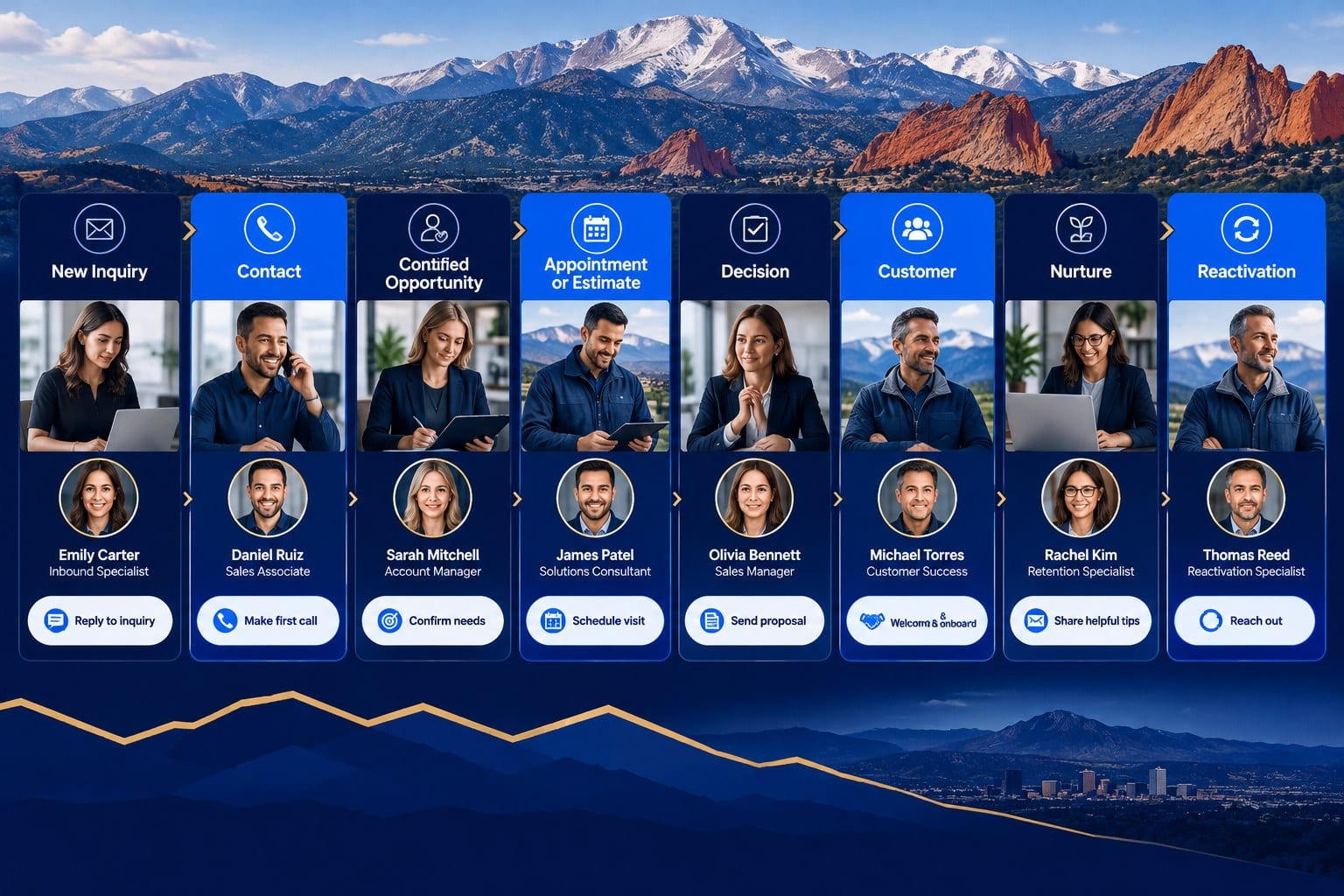
Lifecycle stages describe the customer’s progress through the relationship. They give marketing, sales, operations, and leadership a shared language.
Common stages may include:
- 1. New inquiry
- 2. Attempting contact
- 3. Connected
- 4. Qualified
- 5. Appointment scheduled
- 6. Estimate or proposal issued
- 7. Decision pending
- 8. Customer
- 9. Nurture
- 10. Disqualified
- 11. Lost
- 12. Reactivation opportunity
The exact names matter less than the definitions.
Each stage should specify:
- Entry criteria
- Responsible owner
- Required fields
- Expected next action
- Time expectation
- Exit criteria
- Permitted automation
- Reporting meaning
For example, “qualified” should not mean that someone opened an email. It may mean the lead needs a service the company provides, falls within the service area, meets a practical project requirement, and has agreed to the next sales step.
HubSpot’s official documentation on using lifecycle stages illustrates how stages can be stored and tracked at the contact and company level. Any CRM can use a similar discipline, even when its terminology differs.
Stage definitions protect reporting integrity. If one salesperson marks every conversation as an opportunity while another waits for an issued proposal, the pipeline report is comparing different realities.
Ownership must be equally clear. Every active lead or opportunity should have:
- One named owner
- One visible next action
- One due date
- One current stage
Shared responsibility without named ownership often means everyone can see the lead and nobody is responsible for it.
Route Every Inquiry to a Named Owner
Lead routing determines where an inquiry goes and who must act.
Routing rules may use:
- Service requested
- Product
- Geographic location
- Business unit
- Account type
- Existing customer status
- Language
- Availability
- Sales territory
- Lead quality
- Urgency
- Workload
The routing system should account for normal operations and exceptions.
What happens when the assigned person is unavailable? Who receives an after-hours emergency request? How are duplicate inquiries handled? What happens when a lead selects the wrong service? Who monitors unassigned records?
A practical routing process includes:
- 1. Create or match the customer record.
- 2. Apply source and request information.
- 3. Assign a named owner.
- 4. Create the next action and deadline.
- 5. Send the appropriate acknowledgment.
- 6. Notify the owner.
- 7. Escalate when the deadline is missed.
- 8. Record the outcome.
The CRM should make inaction visible. It should not quietly preserve an untouched lead until someone discovers it during a quarterly cleanup.
Connect Marketing Channels Without Erasing Their Roles
SEO, PPC, social media, email, referrals, events, direct traffic, and offline campaigns contribute differently to the customer journey.
The purpose of CRM integration is not to force every channel into one last-click label. It preserves useful source context and connects marketing activity to the customer record.
The preceding guide explains how to connect SEO, PPC, social media, and email while maintaining a distinct job for each channel.
The CRM may store:
- Original source
- Most recent source
- Campaign
- Landing page
- Form or conversion point
- Referring source
- Known content engagement
- Sales-reported source
- Offline source
- Customer-provided explanation of discovery
These fields should be defined consistently. “Google,” “organic,” “website,” and “internet” may describe overlapping facts rather than four independent sources.
The company should also distinguish discovery source from conversion source.
A customer may first discover the business through organic search, return through paid search, review social proof, and finally call after an email. The CRM should preserve enough context to evaluate that journey without pretending the final interaction worked alone.
The goal is usable evidence, not perfect certainty. Marketing attribution is an analytical model built from incomplete observations, not a surveillance camera following every customer thought.
Give Sales the Context Behind the Lead
A useful CRM record should help the salesperson begin the right conversation.
Relevant context may include:
- Service or product requested
- Location
- Page or offer that produced the inquiry
- Questions submitted
- Prior conversations
- Content or event history when appropriately tracked
- Existing-customer relationship
- Appointment details
- Qualification information
- Urgency
- Communication preference
- Previous estimate or proposal
The customer should not need to repeat the same information each time the inquiry moves between marketing, customer service, sales, estimating, and operations.
This is where the CRM supports a better human experience.
The salesperson remains responsible for listening, clarifying, diagnosing, explaining, and building trust. The system provides context so the conversation can begin from a more informed position.
AI may summarize records, identify missing fields, prepare call context, or suggest follow-up content. Those capabilities are useful only when the underlying record is accurate, and the salesperson reviews the output.
Use the CRM to Support Lead Qualification
Qualification helps the business distinguish an inquiry from a realistic opportunity.
Useful qualification factors may include:
- Service or product fit
- Geographic fit
- Project or account size
- Timing
- Budget range when appropriate
- Decision authority
- Required capabilities
- Existing relationship
- Urgency
- Availability
- Risk or compliance constraints
The CRM should store the factors used to make the decision, not merely the final label.
Our article on AI lead qualification explains how automation can help organize and prioritize opportunities without replacing human review.
Lead scoring should guide attention, not create false precision.
A score of 82 is not inherently meaningful unless the team understands:
- Which behaviors and facts produced it
- Whether those inputs correlate with qualified opportunities
- How often the model is reviewed
- Which cases require an exception
- Whether the score creates unfair or inappropriate exclusions
The sales team should be able to challenge a score and record the actual outcome. Those outcomes create the feedback needed to improve the model.
Make Follow-Up Visible and Accountable
Every active opportunity should have a visible next action.
That action may be:
- Call the customer
- Send requested information
- Schedule an appointment
- Prepare an estimate
- Follow up on a proposal
- Request documentation
- Reconnect at a future date
- Move the record into nurture
- Close the opportunity with a documented reason
The CRM should record:
- Action owner
- Due date
- Completion status
- Attempt count
- Communication outcome
- Next scheduled step
Automated messages can acknowledge an inquiry, confirm an appointment, deliver requested material, remind the customer about a scheduled step, or maintain an approved nurture sequence.
They should not pretend to be a human conversation when the situation requires judgment.
Our guide to automated follow-up without losing the human connection explains where automation can improve consistency and where a real person should take over.
The CRM should also expose follow-up failures:
- New leads without an owner
- Leads with no first response
- Overdue tasks
- Estimates without a scheduled follow-up
- Opportunities stuck in one stage
- Records closed without an outcome reason
- Customers eligible for maintenance or renewal with no next action
These are not merely reporting defects. They are revenue-system defects.
Connect Marketing Activity to Revenue Outcomes
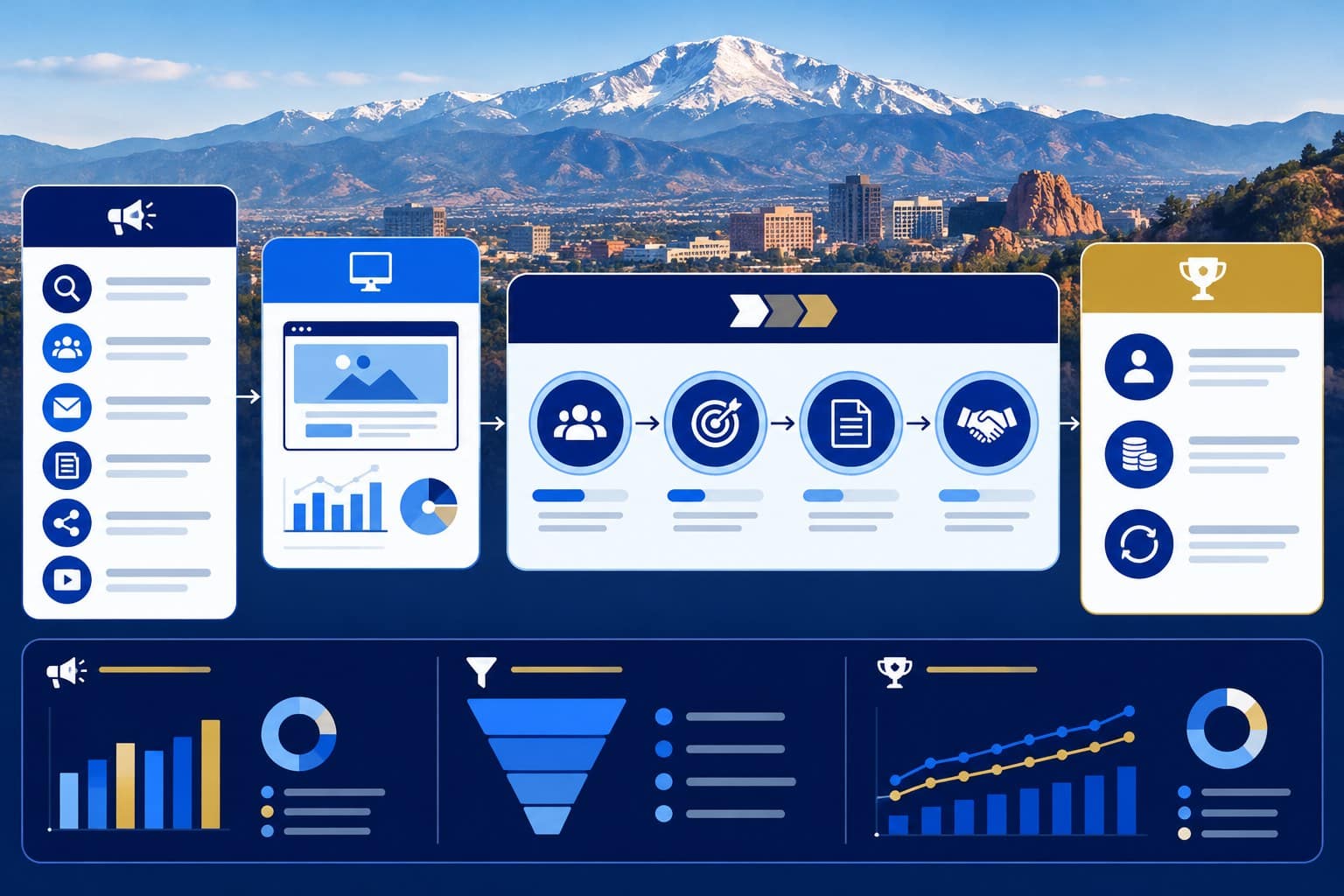
Marketing platforms measure activity closest to the channel. The CRM is strongest at recording what happened to the identifiable opportunity after conversion.
Connecting the systems allows the business to evaluate:
- Which sources produce inquiries
- Which sources produce qualified leads
- Which sources produce estimates, appointments, or proposals
- Which sources produce customers
- Which services or products are requested
- Which locations create value
- How long opportunities take to close
- Where the pipeline loses momentum
- Which campaigns influence repeat or retained business
Google Analytics provides acquisition and attribution reports that help evaluate the interactions preceding key events. Google’s current attribution guidance explains how different models assign credit across ads, clicks, and other factors.
The CRM adds the later business stages that website analytics often cannot fully observe.
The measurement architecture may connect:
- 1. Campaign and source data
- 2. Website sessions and conversion events
- 3. Call, form, chat, or booking records
- 4. CRM contacts and opportunities
- 5. Estimates or proposals
- 6. Customers
- 7. Revenue
- 8. Retention or repeat business
No system will capture every influence perfectly. The objective is a defensible decision system that is more useful than counting leads and hoping they were good.
Treat CRM Data Quality as an AI Requirement
AI can only reason from the data it receives, the rules it is given, and the systems it can access.
A CRM filled with duplicates, inconsistent stages, missing outcomes, vague notes, and inaccurate source fields doesn’t become reliable just because you add an AI layer.
It becomes unreliable faster.
AI-supported CRM functions may include:
- Record summaries
- Lead classification
- Suggested routing
- Duplicate detection
- Missing-data alerts
- Conversation summaries
- Next-action recommendations
- Drafted follow-up
- Pipeline-risk identification
- Forecast assistance
- Reactivation opportunities
- Customer-service context
Before using these capabilities, the company should establish:
- Required fields
- Standard field values
- Stage definitions
- Ownership rules
- Duplicate-management procedures
- Outcome requirements
- Data-retention rules
- Permission boundaries
- Human review
- Error-correction procedures
The article on how AI connects marketing, sales, and customer data explains why shared data becomes valuable only when the organization maintains clear definitions and responsible access.
Clean data does not require perfection. It requires standards, monitoring, and a way to correct errors.
Automate Repetition Without Automating Judgment
CRM automation should remove predictable administrative friction.
Appropriate automation may include:
- Creating a contact from a form
- Applying source information
- Routing by service or geography
- Assigning a task
- Sending an acknowledgment
- Creating reminders
- Updating a stage after a verified event
- Alerting managers to overdue action
- Starting an approved nurture sequence
- Sending appointment reminders
- Requesting a review after a confirmed milestone
- Flagging incomplete records
Human judgment should remain central when:
- The customer’s need is unclear
- The situation is sensitive
- The product or service requires diagnosis
- Pricing or scope is customized
- A complaint or conflict exists
- Legal, medical, financial, or regulated guidance is involved
- The customer requests a person
- An AI recommendation conflicts with known facts
- The business relationship requires negotiation or trust
The division is not “humans versus automation.” It is repetitive coordination versus responsible judgment.
Automation should help the team respond consistently while preserving a clear route to a qualified person.
Protect Access, Consent, and Customer Information
CRM data may contain contact information, communication history, project details, financial information, account notes, and other sensitive business or customer records.
The company should define:
- Business ownership of the CRM account
- Administrator roles
- User permissions
- Authentication requirements
- Integration access
- Data export and backup procedures
- Consent and communication preferences
- Data-retention policies
- Offboarding
- Incident response
- Vendor access
Users should receive the access required for their responsibilities, not unrestricted access by default.
The business should also know which integrations can read, write, export, or use CRM data. Connecting an AI tool, email platform, call system, or automation service creates a data relationship that should be evaluated.
The correct requirements vary by industry, jurisdiction, customer data, and contract. Privacy and compliance decisions should be reviewed by qualified professionals when necessary.
Operational convenience does not remove responsibility.
Build a Practical CRM System for a Small Business
A small business does not need the most complicated CRM available. It needs a system the team will consistently use.
A practical starting configuration may include:
- Contact records
- Company or property records when relevant
- Original and recent source
- Service or product interest
- Lead owner
- Lifecycle stage
- Next action
- Due date
- Qualification status
- Estimate or proposal status
- Outcome
- Revenue when appropriate
- Notes and communication history
Start with the customer journey the business already has.
Map:
- 1. How customers discover the company
- 2. Where inquiries occur
- 3. Who receives them
- 4. How they are qualified
- 5. How appointments, estimates, or proposals are managed
- 6. How follow-up works
- 7. How a customer is recorded
- 8. How revenue is connected
- 9. What happens after the sale
Then configure the minimum fields, stages, automations, and reports needed to manage that journey.
Do not begin by importing every historical spreadsheet into a system nobody has tested. Begin with a controlled dataset, validate the process, train the users, and expand deliberately.
Review the CRM as an Operating System
Review the CRM at both the record and system levels.
Weekly Operational Review
Check:
- New unassigned leads
- Overdue first responses
- Overdue tasks
- Opportunities without next actions
- Estimates or proposals awaiting follow-up
- Records stuck in one stage
- Duplicate or incomplete records
Monthly Performance Review
Evaluate:
- Inquiry volume by source
- Qualification rate
- Response time
- Appointment or estimate progression
- Win and loss outcomes
- Sales-cycle length
- Source-to-customer performance
- Service, product, and location patterns
- Follow-up compliance
- Revenue when reliably connected
Quarterly System Review
Revisit:
- Stage definitions
- Routing rules
- Required fields
- Automation logic
- Integrations
- Permissions
- Reports
- Data quality
- User adoption
- Training
- Business changes
The purpose is not to make the CRM team happy. It is to make the customer journey more reliable and the business decisions more informed.
Avoid Common CRM and Funnel Mistakes
Treating the CRM as a Contact List
A contact record without ownership, stage, next action, source context, and outcome does not manage the relationship.
Making Every Field Required
Too many required fields encourage people to enter guesses just to save the record. Require what is essential at each stage.
Allowing Free-Text Versions of Everything
Free text is useful for notes. It is weak for fields the business must group, filter, route, and measure consistently.
Using Stages Without Definitions
If “qualified,” “opportunity,” and “proposal” mean different things to different people, you can’t interpret the pipeline responsibly.
Automating Before Testing the Manual Process
Automation scales the rule it is given. It does not determine whether the rule makes sense.
Tracking Marketing Sources Without Sales Outcomes
Lead counts don’t show whether inquiries became qualified opportunities, customers, or revenue.
Tracking Sales Outcomes Without Source Context
Revenue records without marketing context make it difficult to understand which discovery and conversion systems contributed.
Failing to Close the Record
Every opportunity should eventually have a current stage or documented outcome. An eternally open pipeline is not optimistic. It is inaccurate.
Letting One Vendor Own the System
The business should retain administrative control, access, data exports, and documentation even when an agency or consultant helps configure the CRM.
Adding AI to Unreliable Data
An AI-generated summary of an incomplete record is still an incomplete record, only written more confidently.
Implement the CRM Layer in 90 Days
Days 1–30: Define the Revenue Process
- Map the customer journey
- Identify inquiry sources
- Define customer and opportunity records
- Establish lifecycle stages
- Name owners
- Define qualification
- Identify required source and outcome data
- Audit current integrations and access
Days 31–60: Configure and Test
- Build fields and stages
- Connect priority forms, calls, and booking systems
- Configure routing and tasks
- Create acknowledgments and reminders
- Establish permission levels
- Test duplicate handling
- Test several complete customer journeys
- Train the initial users
Days 61–90: Measure and Improve
- Review unassigned and overdue records
- Validate source data
- Confirm outcomes are being recorded
- Build useful pipeline and revenue reports
- Correct confusing fields
- Remove unnecessary automation
- Document procedures
- Identify the next integration or capability
Do not measure implementation by the number of features activated. Measure whether the business can reliably identify, assign, serve, follow up with, and learn from its opportunities.
Frequently Asked Questions
What is the role of CRM in a marketing funnel?
The CRM creates and maintains the identifiable customer record after conversion. It supports assignment, lifecycle stages, qualification, follow-up, sales activity, outcomes, attribution, retention, and reporting across the customer relationship.
Does a small business need a CRM?
A small business usually needs a consistent way to manage inquiries and customer relationships. That may begin with a simple CRM rather than an enterprise platform. Key requirements include reliable ownership, next actions, stage tracking, customer history, and outcomes.
Is a CRM the same as marketing automation?
No. A CRM primarily manages customer and opportunity records and the related business process. Marketing automation manages triggered or scheduled communications and workflows. Many platforms include both, but you should still define the functions separately.
Can AI automatically manage a CRM?
AI can help summarize, classify, route, detect missing information, recommend actions, and draft communication. It should not operate without defined rules, permission controls, reliable data, monitoring, and human review for decisions requiring judgment.
How should CRM success be measured?
Measure data completeness, response time, ownership, follow-up compliance, stage progression, qualification, estimates or proposals, customers, revenue attribution, sales-cycle length, user adoption, and the quality of decisions the system supports.
Build a Funnel That Remembers What Happened
A connected funnel should remember how the customer arrived, what the customer needed, who responded, what happened next, and whether the relationship produced a business outcome.
The CRM provides that memory.
When it is configured around clear stages, ownership, next actions, source context, outcomes, and responsible automation, it connects marketing activity to customer relationships and revenue decisions.
When you treat it as a passive database, the funnel develops amnesia the moment a prospect becomes valuable.
Elite SEO Consulting helps businesses connect SEO, paid media, websites, conversion paths, CRM workflows, follow-up, sales feedback, and revenue measurement into one accountable system.
Call 719-474-9404 or contact Elite SEO Consulting to discuss the CRM and funnel gaps preventing your marketing data from becoming a reliable revenue system.